
Building an ecommerce website often means making a difficult choice: beautiful, flexible design or powerful ecommerce functionality.
Webflow is widely known for its visual design freedom, animations, and ability to create highly customized websites. Shopify, meanwhile, provides a mature ecommerce ecosystem with product management, checkout, payments, inventory, and integrations.
So, what if you want both?
That is where the Webflow Shopify approach comes in.
In this guide, we'll explore how Webflow and Shopify can work together, the available options for Webflow Shopify integration, and when it makes sense to migrate from Webflow to Shopify or use a more flexible headless architecture.
I. What Is a Webflow Shopify Setup?
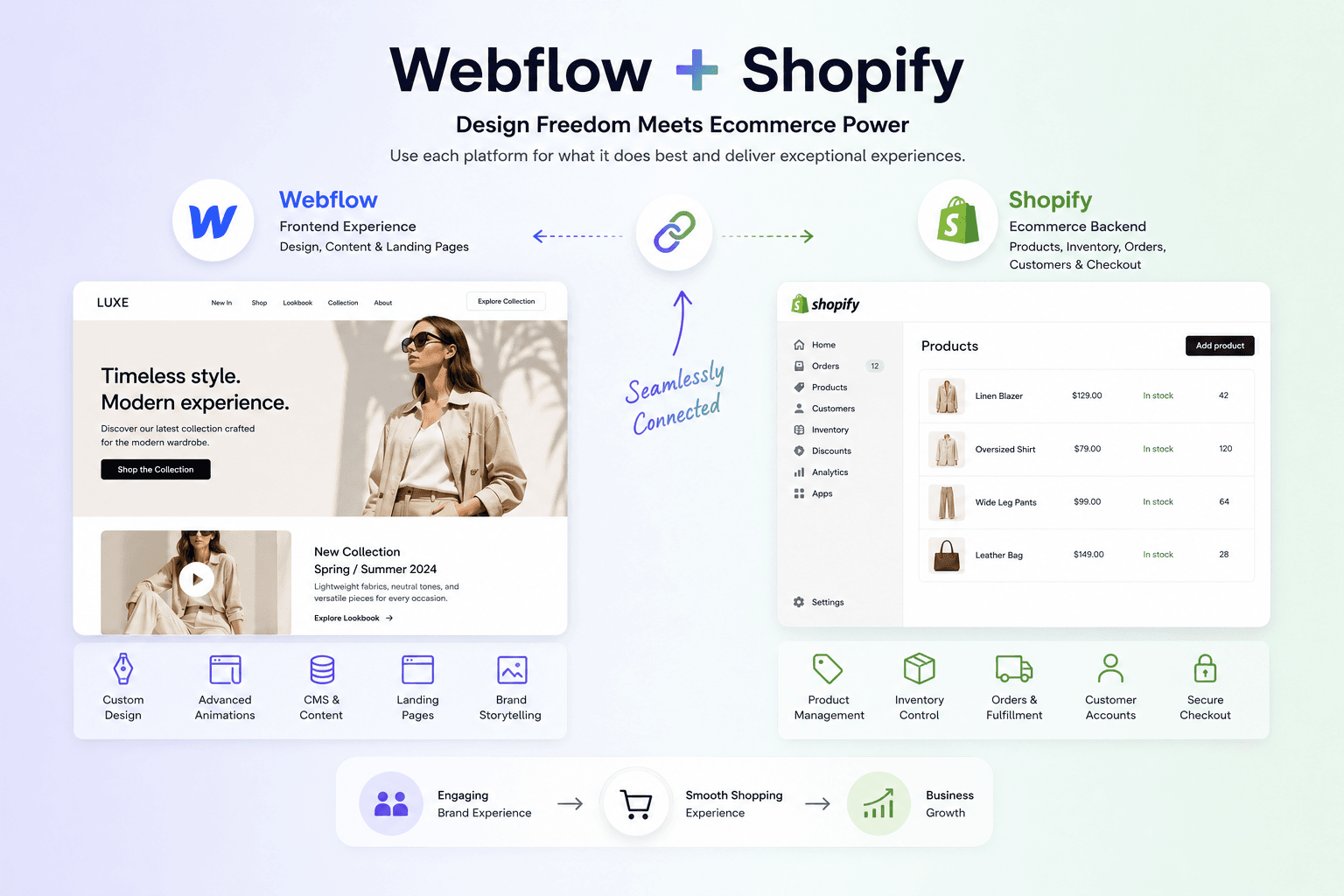
A Webflow Shopify setup combines the strengths of both platforms:
- Webflow handles the frontend experience, visual design, content, and landing pages.
- Shopify handles the ecommerce backend, including products, inventory, orders, customers, and checkout.
Instead of forcing one platform to do everything, businesses can assign each platform the role it does best.
For example, a fashion brand may use Webflow to create immersive campaign pages with advanced animations and custom layouts while relying on Shopify to manage thousands of products and process customer orders.
This is why searches for terms such as Shopify Webflow, Webflow and Shopify, and Webflow Shopify integration continue to grow among brands looking for more flexibility.
II. Webflow vs Shopify: What Does Each Platform Do Best?
Before deciding how to combine them, it helps to understand their individual strengths.
1. Webflow: Built for Design Flexibility
Webflow is particularly strong when design and content presentation are the priority.
Its advantages include:
- Highly customizable layouts
- Advanced visual interactions and animations
- Greater creative control for designers
- Flexible CMS capabilities
- Strong support for marketing and content-driven websites
- Ability to create unique brand experiences without relying entirely on pre-built themes
Webflow can be an excellent choice for brands where the website itself plays a major role in storytelling and conversion.
However, ecommerce becomes more challenging as operational complexity grows.
2. Shopify: Built for Ecommerce at Scale
Shopify is designed specifically for selling online.
Its ecosystem provides:
- Product and inventory management
- Secure checkout
- Payment integrations
- Order management
- Customer accounts
- Discounts and promotions
- Multi-channel selling
- A large app ecosystem
- Scalable ecommerce infrastructure
For businesses with complex ecommerce operations, Shopify provides a much more mature commerce foundation.
The challenge is that brands with highly customized frontend requirements may eventually feel constrained by a traditional theme-based storefront.
That is why combining Webflow with Shopify can be attractive.
III. How Does Webflow Shopify Integration Work?
There is no single Webflow Shopify architecture.
The right approach depends on how much of your website and ecommerce experience you want each platform to control.
Here are the most common options.
1. Option 1: Use Webflow for Marketing and Shopify for Ecommerce
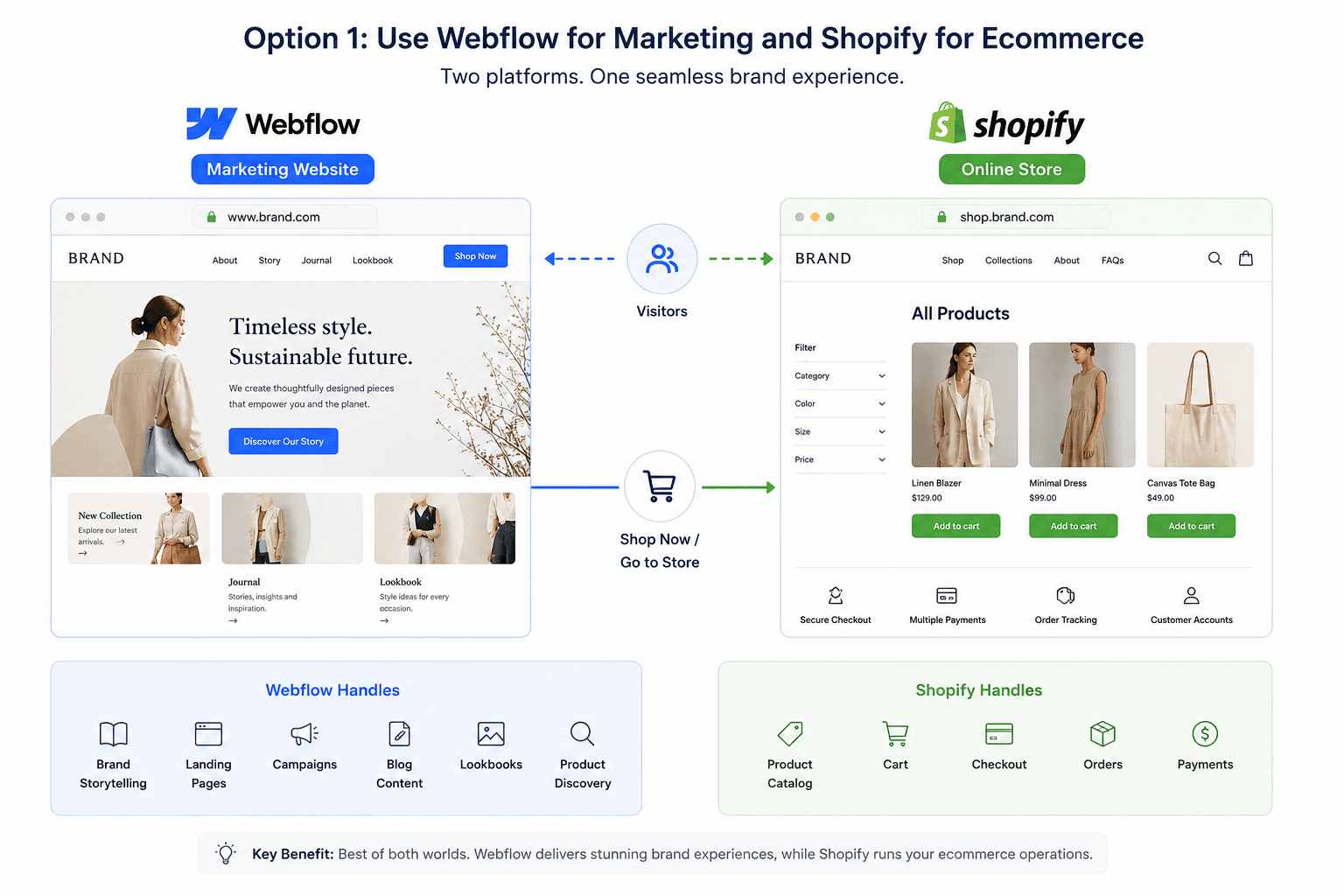
This is one of the simplest ways to use Webflow and Shopify together.
In this setup:
- Webflow powers the main marketing website.
- Shopify powers the online store.
- The two platforms may operate on separate URLs or subdomains.
For example:
-
www.brand.com→ Webflow -
shop.brand.com→ Shopify
The Webflow website can focus on:
- Brand storytelling
- Landing pages
- Campaigns
- Blog content
- Lookbooks
- Product discovery
Meanwhile, Shopify manages:
- Product catalog
- Cart
- Checkout
- Orders
- Payments
Best for:
Brands that want a highly creative marketing website but do not need a deeply integrated ecommerce experience across every page.
Advantages
- Easier to implement
- Each platform handles its core strength
- Lower technical complexity
- Easier for marketing teams to manage Webflow content
- Shopify remains responsible for ecommerce operations
Limitations
The customer experience can become fragmented.
For example, visitors may browse a highly customized Webflow website and then move to a completely different Shopify storefront when they are ready to shop.
Maintaining consistent branding, navigation, and user experience may require additional work.
2. Option 2: Connect Webflow to Shopify for Product Selling
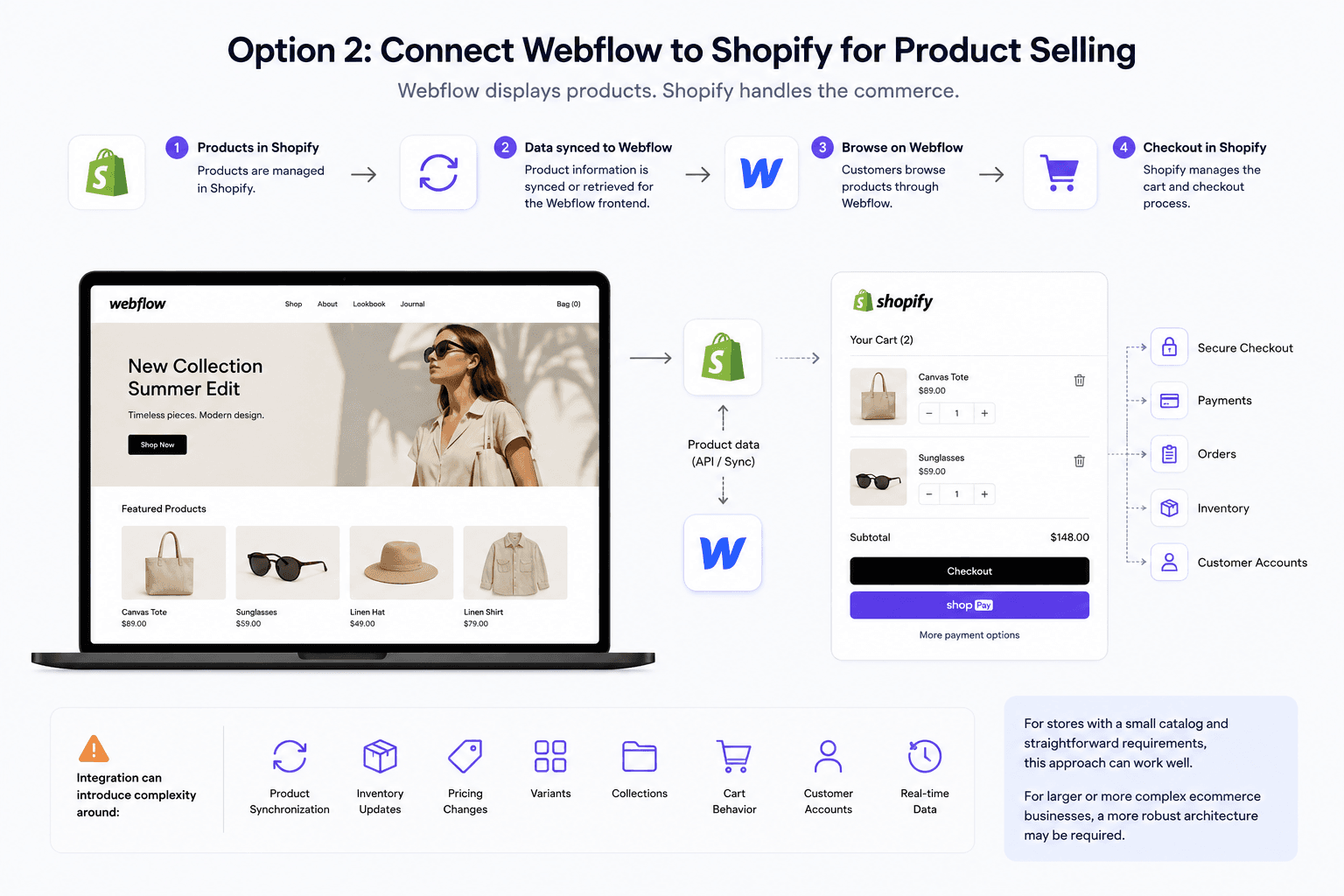 Another approach is to create a Webflow Shopify integration where Webflow displays products while Shopify handles the underlying commerce functionality.
Depending on the implementation, product data can be connected from Shopify and used within the Webflow experience.
The typical flow looks like this:
- Products are managed in Shopify.
- Product information is synced or retrieved for the Webflow frontend.
- Customers browse products through Webflow.
- Shopify manages the cart and checkout process.
This approach gives brands more control over the shopping experience than simply sending visitors from a Webflow site to a separate Shopify store.
However, integrations can introduce complexity around:
- Product synchronization
- Inventory updates
- Pricing changes
- Variants
- Collections
- Cart behavior
- Customer accounts
- Real-time data
For stores with a small catalog and straightforward requirements, this approach can work well.
For larger or more complex ecommerce businesses, a more robust architecture may be required.
Option 3: Build a Headless Webflow Shopify Experience
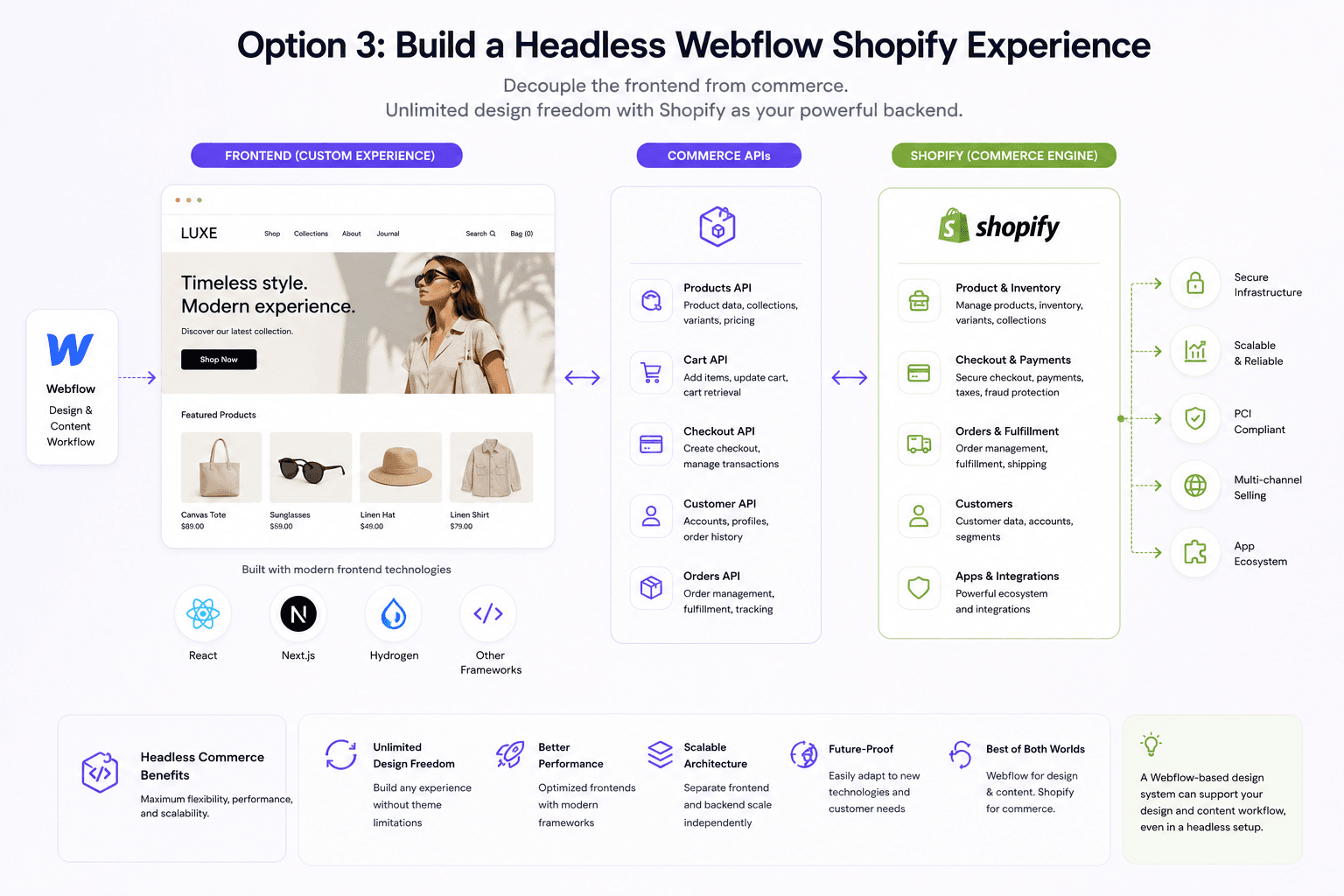 For businesses that need maximum flexibility, Shopify can serve as the commerce engine while a separate frontend handles the customer experience.
This is known as headless commerce. Shopify defines headless commerce as an architecture where the frontend and backend operate independently, enabling businesses to create custom shopping experiences while Shopify manages the commerce infrastructure.
The architecture separates the frontend from the ecommerce backend:
Frontend → Commerce APIs → Shopify
Shopify's Storefront API enables developers to build custom commerce experiences with access to products, collections, carts, and other storefront functionality.
Instead of relying on a traditional Shopify theme, developers can build a custom frontend using technologies such as:
- React
- Next.js
- Shopify Hydrogen
- Other modern frontend frameworks
Shopify continues to manage the ecommerce infrastructure, while the frontend can be designed and developed independently.
A Webflow-based design system can also play a role in the design and content workflow, depending on the technical architecture.
Why consider a headless approach?
A headless setup can provide:
- Greater frontend flexibility
- Better control over performance
- Custom user experiences
- More freedom for developers and designers
- Easier integration with external systems
- More flexibility for complex content and commerce experiences
However, headless commerce requires more technical expertise than a traditional Shopify store.
It is usually best suited for brands that have specific performance, UX, or integration requirements.
IV. Webflow to Shopify: When Should You Migrate?
Not every business needs to combine the two platforms.
Sometimes the better option is to move completely from Webflow to Shopify.
A Webflow to Shopify migration may make sense when your ecommerce operation has outgrown your current setup.
Common signs include:
1. Your Product Catalog Is Growing
Managing a few products is very different from managing hundreds or thousands.
As your catalog grows, you may need better support for:
- Inventory
- Product variants
- Collections
- Discounts
- Fulfillment
- Order management
Shopify is purpose-built for these ecommerce operations.
2. You Need More Ecommerce Integrations
Modern ecommerce businesses often rely on multiple systems, including:
- Email marketing
- Loyalty programs
- Subscriptions
- Reviews
- Search
- Personalization
- Customer support
- ERP systems
- Marketing automation
Shopify's ecosystem can make it easier to connect these tools.
3. Checkout Is Becoming a Priority
Checkout is one of the most critical parts of an ecommerce website.
If your business needs a stable and optimized commerce infrastructure, Shopify provides a mature checkout environment designed specifically for online transactions.
4. Your Team Wants Simpler Ecommerce Management
Marketing teams may love Webflow's design capabilities, but ecommerce teams need efficient workflows for managing products and orders.
Moving from Webflow to Shopify can simplify day-to-day commerce operations by centralizing product and order management.
V. Should You Use Webflow and Shopify Together?
The answer depends on your business goals.
Choose a Webflow + Shopify setup if:
- Your brand needs advanced visual storytelling.
- Your marketing team relies heavily on Webflow.
- Design flexibility is a major priority.
- You want Shopify's ecommerce capabilities.
- Your website includes complex campaigns or content experiences.
- You have the technical resources to manage an integration.
Choose Shopify alone if:
- Ecommerce is the main purpose of your website.
- You want one platform for products, orders, and storefront management.
- Your team prefers simpler operations.
- You want to launch quickly.
- A Shopify theme or custom Shopify storefront can meet your design needs.
Consider Headless Shopify if:
- Your ecommerce experience requires deep customization.
- Performance is a major competitive advantage.
- You need complex integrations.
- Your business has a large or technically sophisticated digital ecosystem.
- Your development team wants complete control over the frontend.
VI. Webflow Shopify Integration: Key Challenges to Consider
Combining platforms can create powerful customer experiences, but it also introduces additional complexity.
Before implementing a Webflow Shopify integration, consider the following.
VII. Webflow Shopify vs Headless Shopify
Both approaches aim to provide more frontend flexibility than a traditional ecommerce setup, but they serve different needs.
There is no universal winner.
The right solution depends on your business model, technical resources, and customer experience requirements.
VIII. How TrueStorefront Can Help with Shopify Development
At TrueStorefront, we help ecommerce businesses build Shopify experiences that go beyond standard templates.
Whether you are evaluating Webflow Shopify integration, planning a Webflow to Shopify migration, or considering a fully customized headless storefront, the first step is understanding what your business actually needs.
A successful ecommerce architecture should balance:
- Design flexibility
- Ecommerce functionality
- Performance
- Scalability
- Marketing requirements
- Long-term maintenance
For some brands, a standard Shopify implementation is the right choice.
For others, Shopify combined with a custom frontend or headless architecture can unlock greater flexibility and a more differentiated shopping experience.
The goal should not be to use the most complex technology.
It should be to build the architecture that best supports your customers and business growth.
Final Thoughts
The growing interest in Webflow Shopify, Webflow and Shopify, and Webflow Shopify integration reflects a broader change in ecommerce.
Brands no longer want to choose between beautiful digital experiences and powerful commerce infrastructure.
Webflow offers significant creative freedom. Shopify provides a proven ecommerce foundation.
For the right business, combining these strengths can create a more flexible digital commerce experience.
However, integration is not always the answer.
If ecommerce operations are becoming increasingly complex, migrating from Webflow to Shopify may provide a simpler and more scalable solution. If your brand requires complete frontend freedom, a headless Shopify architecture may be the better long-term investment.
The key is to start with your business requirements—not the technology.
Need help choosing the right Shopify architecture for your ecommerce business? Contact TrueStorefront to discuss your Shopify migration, custom storefront, or headless commerce project.
Read more: