
Table of contents
Shopify continues to operate at a large scale. The platform reports that millions of businesses across more than 175 countries use Shopify, with $378 billion in GMV generated in 2025. Shopify also lists more than 21,000 apps in its app ecosystem.
That scale creates an opportunity for growing ecommerce businesses, but it also creates a challenge. As orders, customers, products, sales channels, and business processes increase, managing everything manually becomes harder.
A growing Shopify Store needs more than a good storefront. It needs connected systems that can exchange data, automate repetitive work, and support new business processes without creating more manual tasks.
This is where APIs, automation, and third-party integrations become important.
What Is a Shopify Store?

A Shopify Store is an ecommerce storefront built on Shopify where businesses can sell products, manage orders, handle customers, track inventory, and connect different commerce tools.
A normal Shopify store can manage these activities with Shopify's built-in features and a few apps. However, the requirements change as the business grows.
A larger store may need to connect Shopify with an ERP, CRM, warehouse management system, accounting software, shipping provider, marketing platform, customer support system, marketplace, or custom business application.
Instead of moving information manually between these systems, APIs can create a direct connection.
That means an order placed in Shopify can trigger actions in other systems without someone copying the information from one platform to another.
Why Shopify Stores Need Integration to Scale
Scaling ecommerce is not simply about getting more visitors or adding more products.
Growth also increases the amount of operational work behind every sale.
For example, a single order may require inventory updates, payment processing, fulfillment, shipping, customer notifications, accounting entries, and marketing updates.
If these processes operate separately, the workload increases quickly.
Integration helps connect these processes.
A typical setup might look like:
Shopify Store > API > ERP > Warehouse > Shipping > Customer Notifications
At the same time, customer and order data can move into a CRM or marketing platform.
So, instead of creating more manual processes as sales increase, businesses can create automated workflows that handle more of the workload.
How APIs Help Scale a Shopify Store
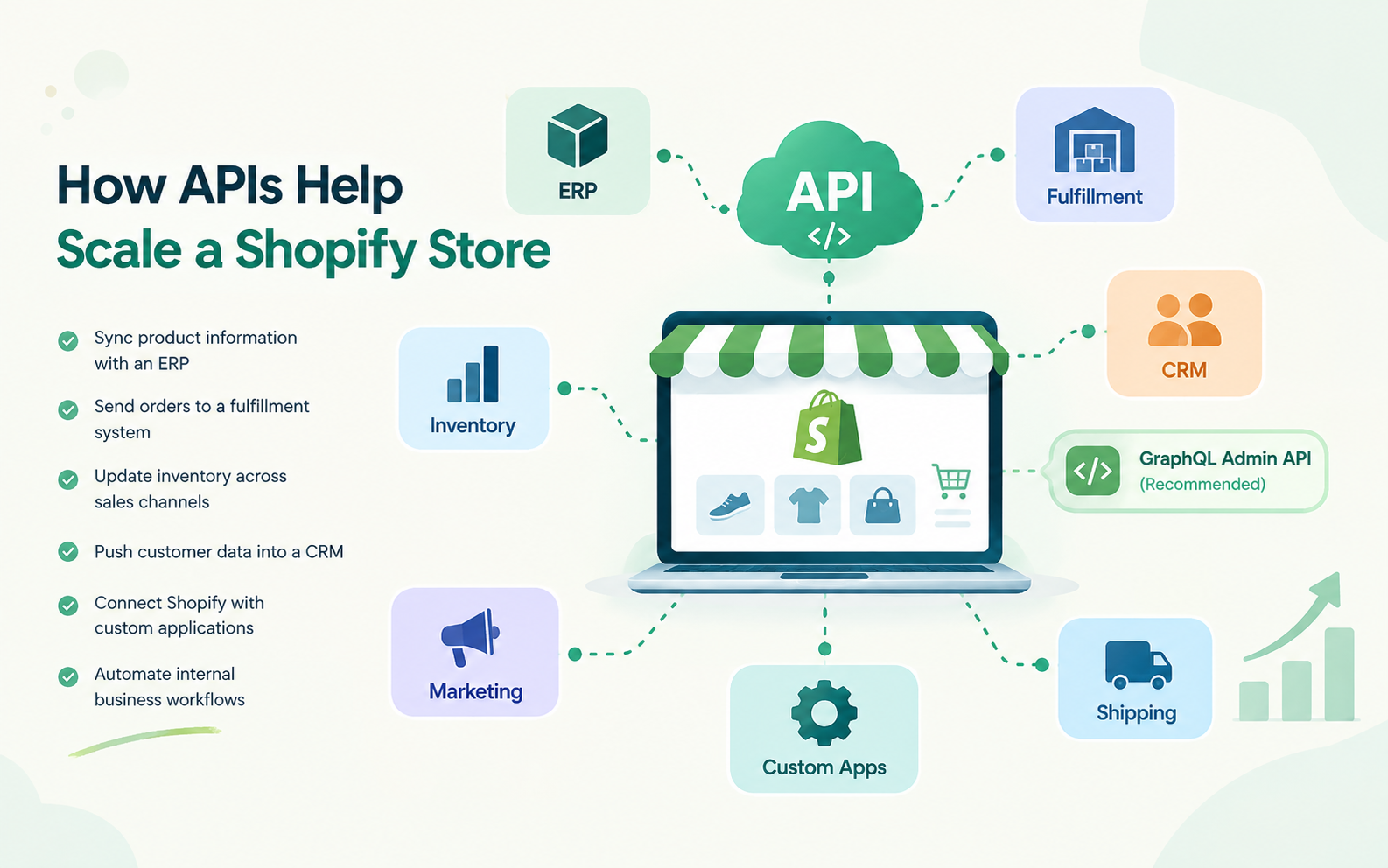
APIs allow different software systems to communicate with each other.
Shopify's GraphQL Admin API supports reading and writing store data such as products, customers, orders, inventory, and metafields. Shopify also recommends the GraphQL Admin API for new apps, while the REST Admin API is now considered legacy.
This gives businesses more flexibility when they need functionality beyond standard Shopify features.
For example, an API integration can help a business:
Sync product information with an ERP
Send orders to a fulfillment system
Update inventory across sales channels
Push customer data into a CRM
Connect Shopify with custom applications
Automate internal business workflows
The important point is that APIs turn Shopify from an isolated storefront into part of a larger commerce ecosystem.
Automate Order and Inventory Management
Order management is one of the first areas where automation can make a noticeable difference.
Imagine a customer places an order.
Instead of an employee downloading the order and entering it into another system, an automated workflow can send the relevant information directly to the fulfillment or ERP system.
Then, once the order is processed, the status can move back into Shopify.
Inventory works similarly.
When stock changes in a warehouse, the integration can update inventory levels in Shopify. This reduces the risk of selling products that are no longer available.
Shopify supports webhooks that notify applications when specific events happen, allowing apps to react to changes rather than repeatedly checking Shopify for updates.
So, the workflow can become event-driven:
Order Created > Webhook > Fulfillment System > Processing > Shopify Status Updated
This is faster and generally more efficient than constantly polling for changes.
Connect Shopify With ERP and Accounting Systems
A growing Shopify Store often needs an ERP or accounting system to manage business operations beyond ecommerce.
The problem is that Shopify and an ERP may maintain separate records for products, customers, orders, taxes, payments, and inventory.
An integration can synchronize the required information between them.
For example, a completed Shopify order can automatically create a corresponding transaction in the accounting system.
Likewise, updated product costs or inventory information from an ERP can be pushed back into Shopify.
The exact data flow depends on the business, but the goal remains the same: reduce duplicate data entry and keep important systems synchronized.
Integrate CRM and Marketing Platforms
Customer data becomes more valuable as a store grows.
A Shopify Store can collect information about purchases, customer activity, order history, and product preferences. Connecting Shopify with a CRM or marketing platform allows businesses to use this information more effectively.
For example, an integration can trigger a customer journey after a purchase.
A customer buys a product > order data enters the CRM > customer receives a relevant follow-up > the marketing system tracks engagement.
This can support personalized campaigns without requiring employees to manually create customer segments.
The same approach can support abandoned-cart workflows, loyalty programs, post-purchase campaigns, and customer reactivation.
Use Third-Party Integrations Without Creating a Mess
Third-party apps can extend Shopify's capabilities, but adding too many disconnected tools can create another problem.
Every new application can introduce another data source, integration, authentication method, and workflow.
That's why businesses should decide which system owns each type of data.
For example, Shopify may remain the primary source for ecommerce orders, while an ERP manages inventory and accounting software manages financial records.
Then, APIs synchronize the information that each system actually needs.
This approach reduces unnecessary data duplication and makes the architecture easier to maintain.
Where Shopify API Integration Becomes Useful
Businesses often reach a point where standard apps are no longer enough.
They may need a custom workflow, a proprietary business rule, or a connection between Shopify and an internal application.
This is where Shopify API Integration can provide more flexibility.
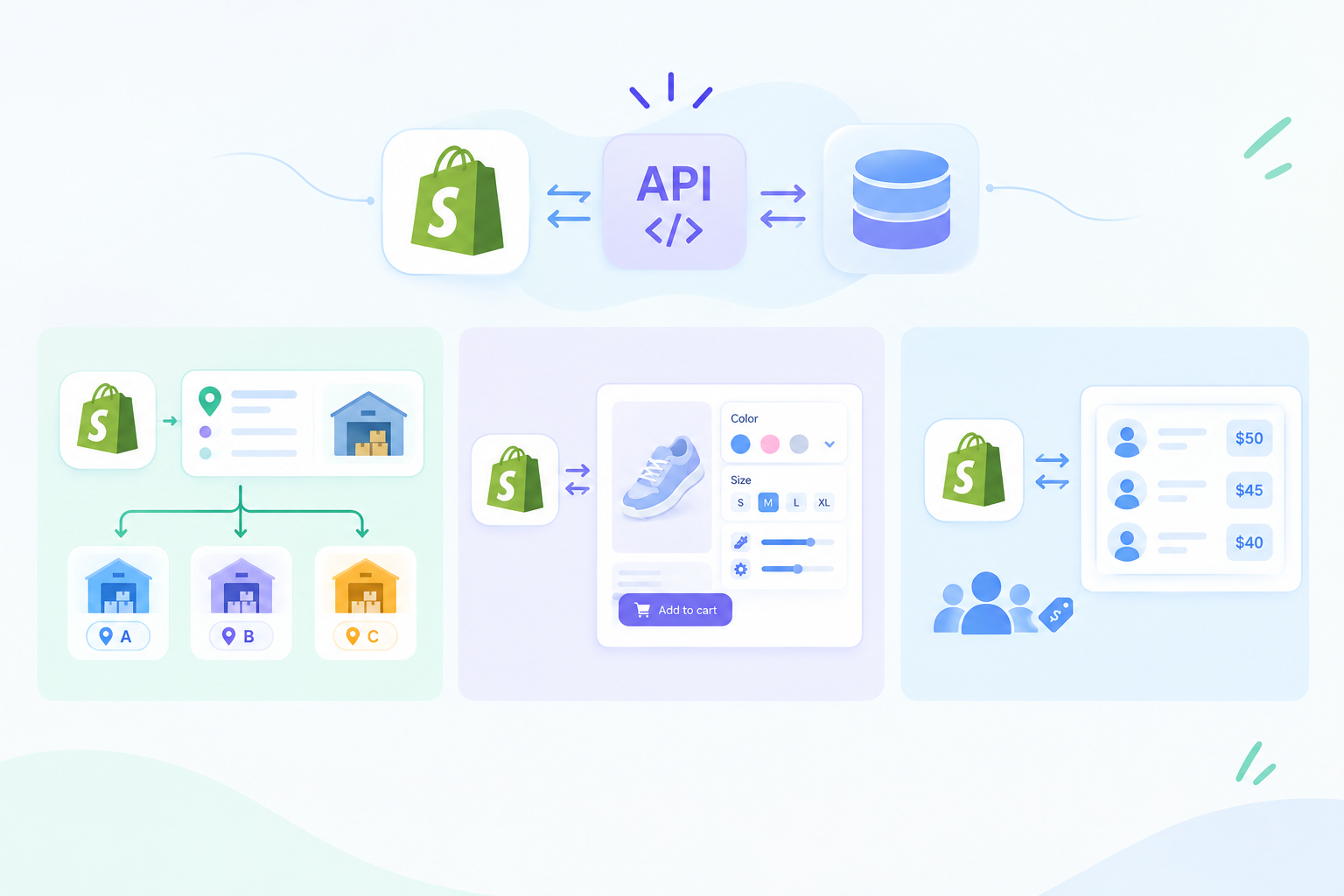
For example, a business could build an integration that automatically assigns orders to warehouses based on inventory levels and delivery locations.
Also Read: How to Connect APIs in Shopify Headless Commerce
Another business may connect Shopify with a custom product configuration system.
A wholesale business could synchronize customer-specific pricing between Shopify and its internal sales platform.
The API approach lets the integration follow the business process rather than forcing the business to work around a standard app's limitations.
Add Automation to Customer Service
Automation can also help a Shopify Store handle higher volumes of customer support requests.
When an order is placed, customers often ask about delivery status, returns, refunds, or product availability.
Shopify can be connected with customer support platforms so agents can access relevant order information without switching between multiple systems.
Automation can also route support requests.
For example, a delivery-related question can be connected to order and shipping information before reaching the support team. A return request can trigger a predefined workflow.
This reduces repetitive work and gives support teams more context.
Use AI With Shopify Integrations
AI becomes more useful when it has access to reliable business data.
A Shopify Store can connect AI applications with approved product, customer, order, and inventory information through APIs.
That creates several practical AI use cases.
AI Product Recommendations
AI can analyze customer behavior and product information to recommend relevant products.
AI Customer Support
An AI assistant can retrieve order information and answer routine questions about products, delivery, returns, or account activity.
AI Sales Analysis
AI can analyze sales and customer data to identify trends, unusual changes, or products that need attention.
AI Inventory Insights
AI can combine historical sales, inventory levels, and other approved data to help teams identify potential stock issues.
However, AI should not receive unrestricted access to the entire store.
Access should follow clear permissions, and sensitive actions such as refunds, order changes, or customer-data updates should have appropriate validation and controls.
Build Automation Around Webhooks and Events
A scalable Shopify integration should react to important events instead of relying only on scheduled data checks.
For example:
Product Updated > Trigger Inventory Workflow
Order Created > Trigger Fulfillment Workflow
Customer Created > Trigger CRM Workflow
Order Fulfilled > Trigger Customer Notification
Shopify's current API ecosystem supports webhooks and events for responding to changes in store data. Shopify describes webhooks as the production mechanism for receiving changes, while its newer Events capability is available in developer preview for a subset of topics.
This event-driven approach can make integrations more responsive while reducing unnecessary API requests.
Build a Shopify Store That Can Grow
A scalable Shopify Store has connected APIs, automation, and third-party systems to reduce manual work. AI can further improve data analysis, customer support, personalization, and operations. Start with repetitive tasks, automate them, and monitor performance as the store grows.