
A shopper can arrive at a Shopify store with a clear idea of what they want, or with only a vague need. In both cases, the store has to help them move from interest to the right product without making them work for it.
That is the core of ecommerce product discovery. Good discovery isn't limited to a search bar. It involves navigation, collections, filters, product data, recommendations, personalization, and mobile usability working together.
Shopify provides native capabilities for search, predictive search, storefront filtering, and product recommendations, but the way merchants configure and present these features has a major effect on the shopping journey.
Here are seven practical ways Shopify stores can make products easier to find.
1. Build Navigation Around How Customers Shop
A common mistake is organizing a store according to its internal catalog structure rather than the way customers think about products.
A shopper should not need to understand how your inventory is organized. They should be able to recognize where they need to go.
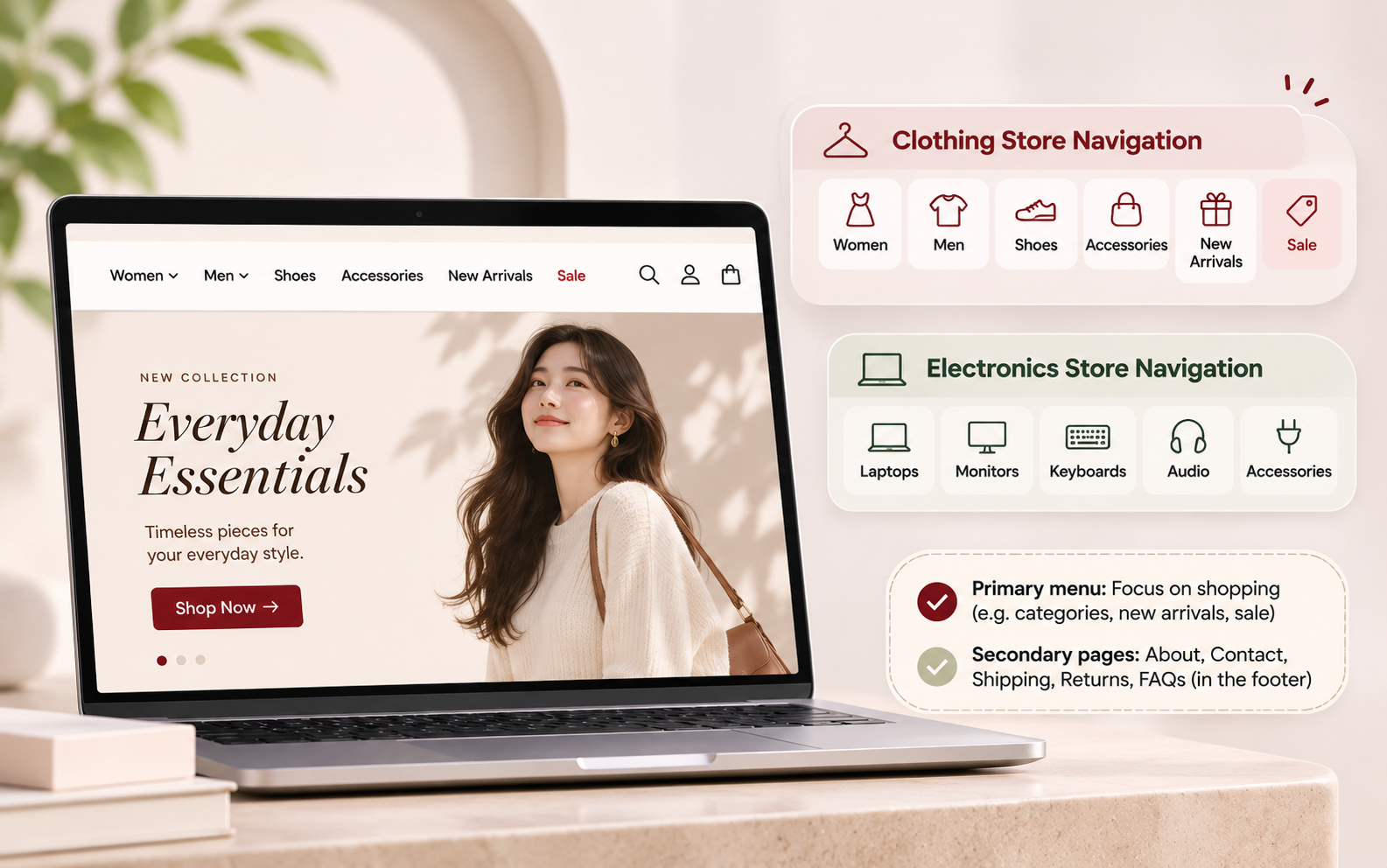
For example, a clothing store could organize its main navigation around:
Women
Men
Shoes
Accessories
New Arrivals
Sale
An electronics store might use:
Laptops
Monitors
Keyboards
Audio
Accessories
The categories should reflect meaningful shopping decisions.
This is especially important for larger catalogs. A customer browsing hundreds of products should be able to narrow their journey before reaching individual product pages.
Keep the primary menu focused on shopping. Secondary pages such as About, Contact, Shipping, Returns, and FAQs can remain accessible through the footer.
2. Make Shopify Product Search More Useful
A search box is only useful when it understands what shoppers are looking for.
Shopify product search supports product queries and can return results based on relevance. Shopify also supports predictive search, which can show product, collection, page, and article suggestions while a customer types.
Consider a shopper searching for "black running shoes."
A useful search experience should help surface relevant running shoes rather than forcing the shopper to know the exact product name.
Merchants should therefore review:
Common customer search terms
Product names and descriptions
Synonyms and alternative terminology
Misspellings
Product attributes
Out-of-stock behavior
Predictive search suggestions
For example, a store selling sneakers may need to account for shoppers using "trainers" rather than "sneakers."
Also examine internal search behaviour regularly. Shopify's analytics can show how often sessions include searches, while Search & Discovery reporting provides metrics for recommendation engagement.
Search data can reveal catalogue gaps, confusing terminology, and products customers expect to find but cannot.
3. Use Filters That Match Real Buying Decisions
Filters are one of the simplest ways to improve ecommerce product discovery when a store has a large or complex catalog. Shopify's storefront filtering supports attributes such as availability, category, price, product type, vendor, variant options, and metafields.
But more filters do not automatically create a better experience. The right filters depend on the category.
Product Category | Key Filters Shoppers May Consider |
Apparel | Size, Color, Fit, Material, Price |
Electronics | Brand, Storage, Screen Size, Compatibility, Price |
Furniture | Material, Dimensions, Color, Room, Style |
Imagine someone shopping for a laptop. Filters for "black," "new," and "featured" may be less useful than RAM, storage, screen size, operating system, and price.
Filters should answer the questions shoppers actually use to eliminate products.
Also make selected filters visible. A shopper should know why a particular set of products is being displayed and be able to remove individual selections without starting over.
4. Make Shopify Product Recommendations Contextual
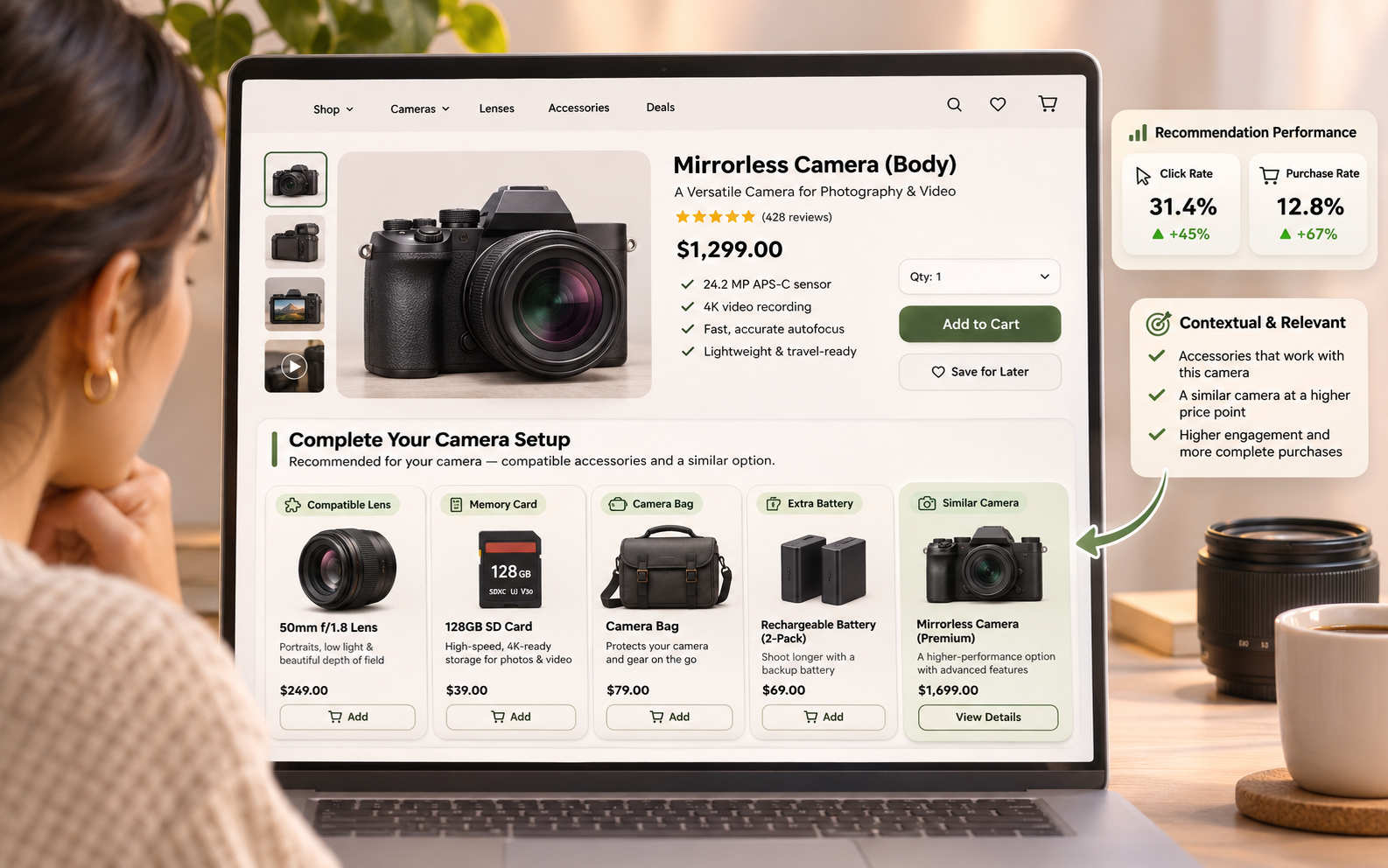
Recommendations work best when they have a clear reason for appearing.
Shopify product recommendations can help customers discover related products. It can also allow merchants to track recommendation performance through metrics such as click rate and purchase rate.
Consider a customer viewing a camera. A generic "You may also like" section might show another unrelated camera. However, a more useful recommendation could include:
Compatible lenses
Memory cards
Camera bags
Extra batteries
A similar camera at a different price point
5. Turn Product Pages Into Discovery Tools
A strong product page can help shoppers understand the item and discover other relevant products. Start with the essentials:
Clear product title
Price
Product images
Variant options
Key benefits
Specifications
Availability
Shipping information
Returns information
Then add context where it helps.
For example, a furniture store could show dimensions, materials, compatible collections, and related pieces. An electronics store could explain compatibility and recommend accessories.
Product data also matters beyond the visible page. Consistent product titles, descriptions, attributes, identifiers, and availability make it easier for Shopify's search and recommendation systems to work with the catalog.
This has become even more important as product data increasingly feeds multiple discovery surfaces. In its guide to optimizing Shopify product listings for AI search and recommendations, TrueStorefront explains how a single product record can feed on-store recommendations alongside external AI and shopping surfaces.
The product page should answer the customer's immediate questions while giving them useful next steps.
6. Use Personalization Without Making It Intrusive
Instead of showing every visitor the same products, stores can use signals such as browsing behavior, previous purchases, preferences, or product relationships to create more relevant experiences.
For example, a returning customer who previously purchased running apparel might see new running products or compatible accessories.
But personalization should have a purpose.
Avoid replacing predictable navigation with an opaque personalized interface. Customers still need to know where products are located and how to browse the full catalog.
A better approach is to use personalization as an additional discovery layer. This gives shoppers control while still making relevant products easier to notice.
For stores with more advanced technical requirements, personalization can also be implemented within custom or headless Shopify experiences. TrueStorefront's guide to designing modern UX for Shopify headless stores highlights personalized product recommendations, dynamic landing pages, behavior-triggered experiences, and AI-driven search as examples of how a customized frontend can support more tailored shopping journeys.
7. Design the Discovery Experience for Mobile
A discovery experience that works beautifully on a desktop can become frustrating on a phone.
Mobile shoppers have less screen space, so every element needs to earn its place. Check how these features behave on smaller screens:
Search
Predictive suggestions
Navigation menus
Filters
Sorting
Product cards
Image galleries
Variant selectors
Recommendation carousels
Add-to-cart controls
Filters are a good example.
On the desktop, a sidebar can display several filter groups at once. On mobile, the same approach may consume most of the screen. A drawer or expandable filter interface may work better.
Search also needs to remain easy to access. Shopify supports predictive search experiences where suggestions appear while customers type, allowing them to refine their queries without first navigating to a separate results page.
Mobile performance matters too. Large images, excessive animations, and unnecessary third-party scripts can slow down the experience and make discovery harder.
How Ubuy Illustrates the Importance of Product Discovery
The same principle applies beyond individual Shopify stores. Large marketplaces such as Ubuy have extensive product catalogs, which makes clear categories, search, filtering, and relevant product presentation especially important for helping shoppers narrow their choices.
For Shopify merchants, the lesson is not to copy a marketplace interface. It is to recognize that the larger the catalog becomes, the more important discovery architecture becomes.
A store with 30 products may need little more than clear navigation and useful collections.
A store with thousands of SKUs may need a much more sophisticated combination of search, filters, merchandising, recommendations, and personalized discovery.
How to Measure Product Discovery
Improving discovery should not end with a design update.
Track how shoppers actually use the features you introduce.
Useful signals include:
Sessions with searches
Search result engagement
Search refinements
Product views
Filter usage
Recommendation click rate
Recommendation purchase rate
Add-to-cart activity
Conversion from discovery paths
Shopify provides analytics for search activity and product recommendation performance, including recommendation click and purchase rates.
Look for patterns rather than relying on a single number.
For example, if many shoppers search for a product but leave without viewing an item, investigate the search results. If customers frequently click a recommendation but rarely purchase it, the recommendation may be interesting but poorly matched to the buying context.
The goal is to understand where customers struggle and improve that specific part of the journey.
Final Thoughts
Better Shopify store user experience starts with a simple principle: customers should not have to work hard to find the products they want.
Build navigation around customer intent. Make Shopify product search useful. Add filters based on real buying decisions. Use Shopify product recommendations with a clear purpose. Improve product pages, introduce useful personalization, and make every discovery feature work well on mobile.
Most importantly, treat ecommerce product discovery as an ongoing process rather than a one-time design task.
Review search behavior. Analyze recommendation performance. Watch how customers use filters. Test mobile journeys. Then use those findings to refine the store.