

In the vast ocean of e-commerce solutions, Shopify stands as a titan, offering a spectrum of plans catering to businesses of all sizes. From burgeoning startups to enterprise-level operations, there’s a Shopify plan designed to fit. However, for many entrepreneurs and small businesses, the full suite of features offered by the standard Shopify plans might be an overkill, both in functionality and cost. This is where Shopify Lite enters the scene, presenting itself as a lean, mean, selling machine.
Often misunderstood or overlooked, Shopify Lite is not a stripped-down version of the full Shopify platform in the traditional sense. Instead, it’s a distinct offering designed for a very specific purpose: to empower businesses to sell products without needing a dedicated online store. Think of it as an e-commerce toolkit that integrates seamlessly with your existing online presence, whether that's a blog, a personal website, or even just your social media channels.
This comprehensive guide will deep dive into everything you need to know about Shopify Lite. We’ll dissect its core features, demystify its pricing structure, and illustrate its most effective use cases. By the end of this article, you’ll have a clear understanding of whether Shopify Lite is the ideal solution to expand your sales channels and elevate your business.
I. What Exactly is Shopify Lite?
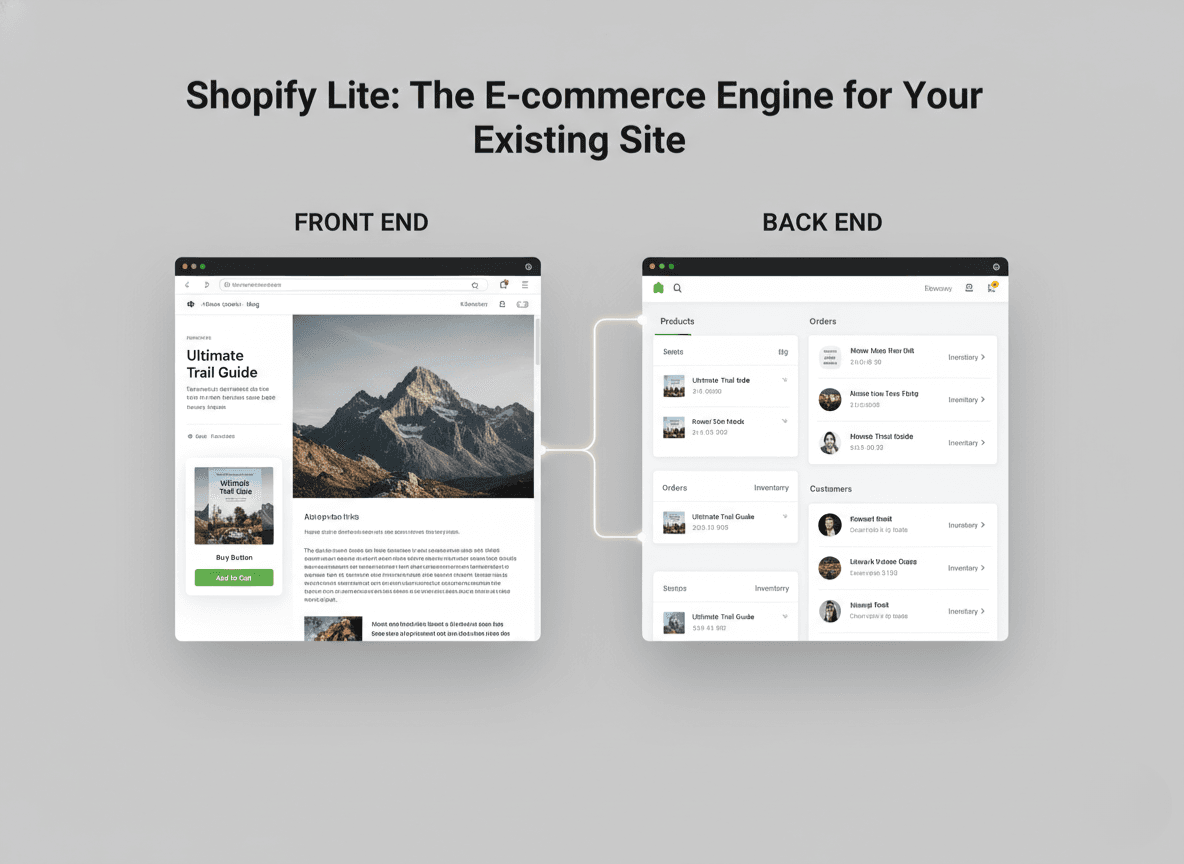
To understand Shopify Lite, you have to separate the "front end" of a website from the "back end." The front end is what customers see: the design, the pages, and the URL. The back end is the engine: inventory management, payment processing, and shipping logistics.
The standard Basic Shopify plan gives you both. Shopify Lite only gives you the back end.
It is a plan designed for merchants who want to sell products but do not need a website builder. It allows you to integrate a shopping cart and checkout process into a WordPress blog, a Squarespace portfolio, a Tumblr page, or even a personal email list. It acts as a bridge, connecting your existing audience to a secure checkout experience without forcing them to navigate to a new domain.
A Note on the "Starter" Plan: It is important to note that Shopify has been transitioning the "Lite" branding toward the "Shopify Starter" plan in many regions. While they share the same DNA, the Starter plan focuses heavily on social selling and link-in-bio tools. However, the core functionality sought by users searching for "Shopify Lite" remains the ability to add products to an external site via the Buy Button. For the purpose of this guide, we will focus on these core capabilities that distinguish this tier from the full store plans.
II. The Core Features of Shopify Lite
Even though it is the cheapest plan available, it is surprisingly robust. You are not getting a "bad" version of Shopify. You are getting the full administrative power of the platform, simply without the website hosting. Here are the standout features.
1. The Buy Button
The crown jewel of Shopify Lite is the Buy Button. This is a tool that allows you to generate a snippet of HTML code for any product in your inventory. You can paste this code onto any third-party website.
When you generate a Buy Button, you are not just embedding a link. You are embedding a fully functional product card. It includes the product image, the price, and a button that says "Add to Cart" or "Buy Now."
The magic happens when a customer clicks that button. A pop-up shopping cart appears on the side of the screen (or a direct checkout window opens) right there on your blog or website. The customer never feels like they have left your site until the secure checkout phase. This seamless integration keeps bounce rates low and user experience high.
2. Shopify POS (Point of Sale) Lite
Many people assume Shopify Lite is only for online sellers. That is incorrect. This plan allows you to accept payments in person using the Shopify POS app on iOS or Android.
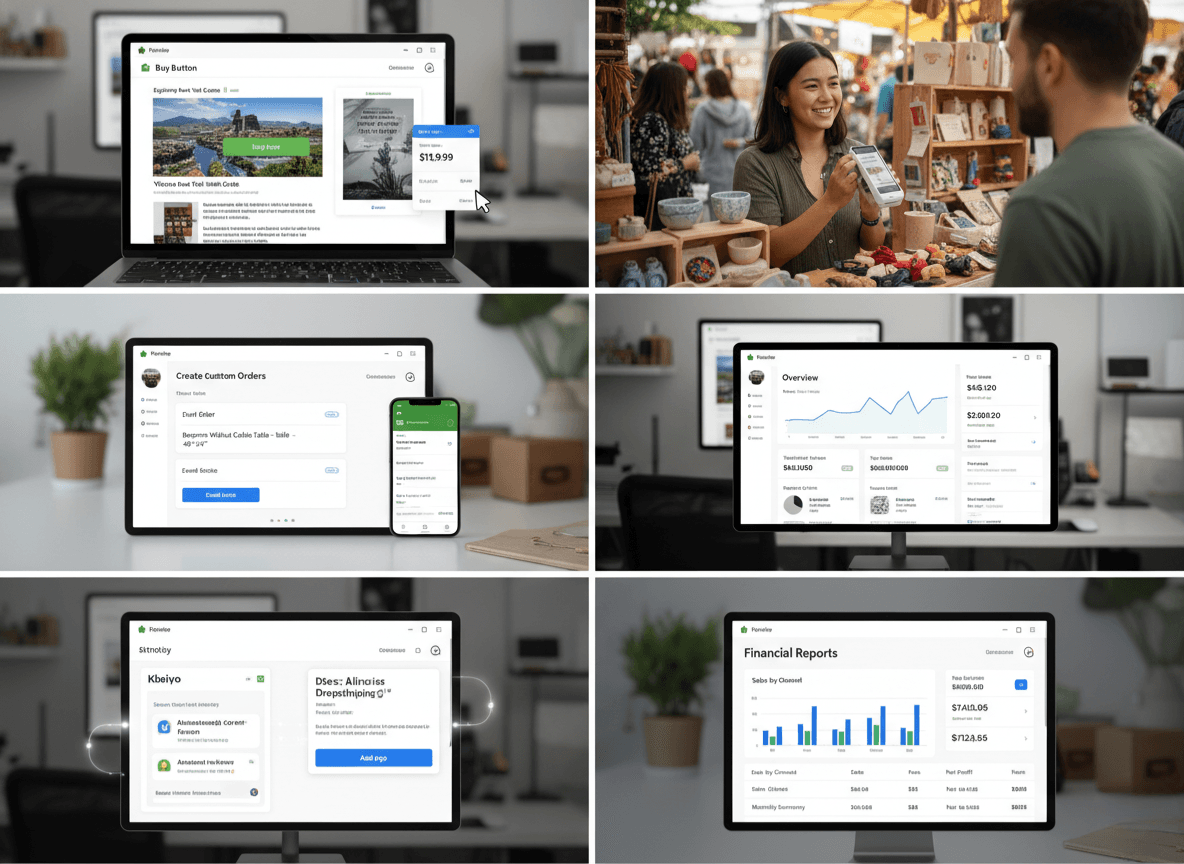
If you sell at farmers' markets, pop-up shops, trade shows, or merchandise tables at concerts, you can use your smartphone to accept credit card payments. The plan supports standard card readers, allowing you to sync your physical sales with your online inventory. If you sell a t-shirt at a market, your inventory count updates automatically in the system.
3. Creating Custom Orders and Invoices
Service providers and B2B wholesalers often love Shopify Lite for this specific feature. You can log into your dashboard and create a "Draft Order."
Let’s say you are a graphic designer selling a custom logo package, or a furniture maker building a custom table. You do not need to list this product publicly. You can draft an order with the specific details and price, then email a professional invoice directly to the client. The client clicks a link in the email, which takes them to a secure Shopify checkout page where they can pay via credit card. It looks professional and ensures you get paid securely.
4. Overview Dashboard and Finance Reports
You gain access to the standard Shopify admin dashboard. This is the control center for your business. Even on the Lite plan, you can view your finances, track your sales over time, and see which products are performing best. You are not flying blind just because you are on a budget plan.
5. Automation and App Access
You still have access to the Shopify App Store. While apps that modify the "Online Store" (like page builders) will not work, backend apps will. This includes apps for accounting automation, dropshipping integration (like Oberlo or DSers), and email marketing tools.
III. Pricing Breakdown: Is It Worth It?
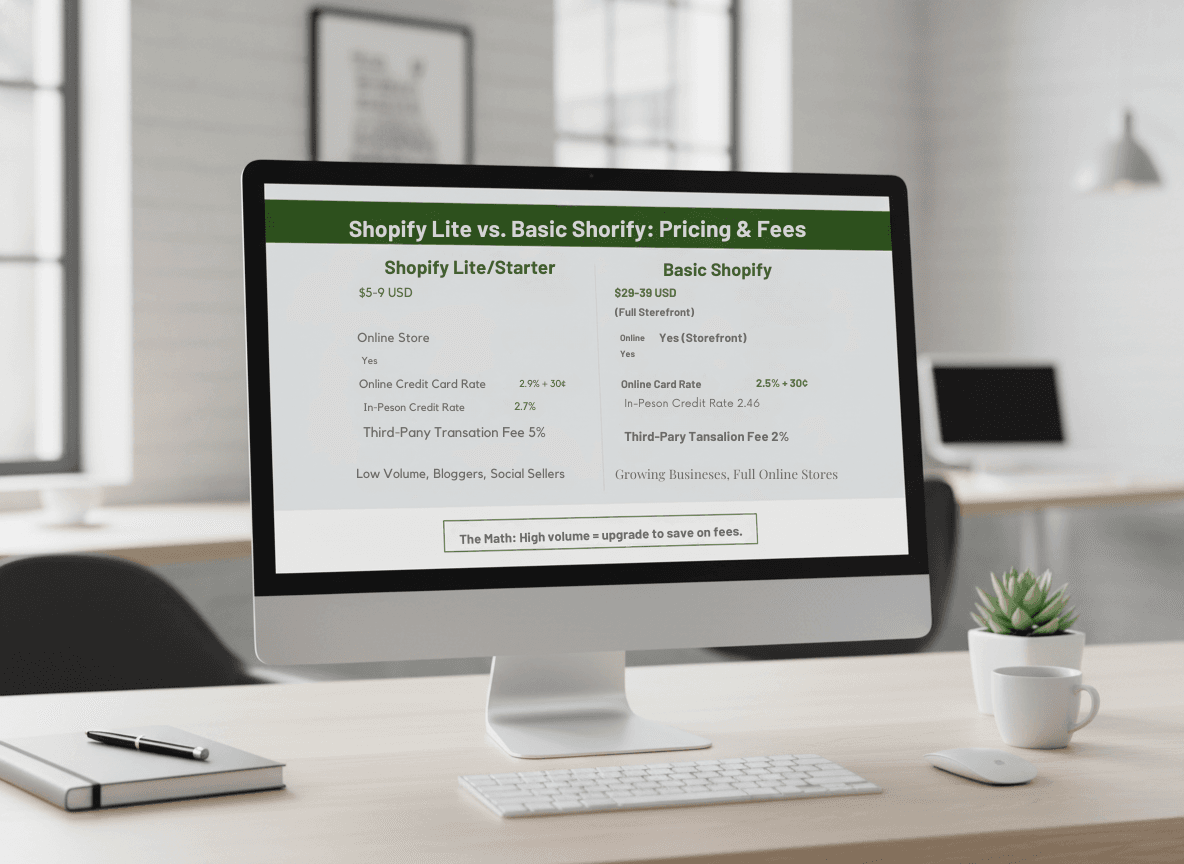
 The traditional pricing for Shopify Lite has hovered around $9 USD per month. The newer Starter plan is often priced at $5 USD per month, though transaction fees can vary.
Here is the financial reality you need to consider.
The Base Cost: At roughly $5 to $9 per month, this is significantly cheaper than the Basic Shopify plan, which usually starts around $29 to $39 per month. This low barrier to entry makes it risk-free for hobbyists.
Transaction Fees: This is where you must pay attention. The lower the monthly fee, the higher the transaction fee usually is.
- Credit Card Rates: You will pay a standard percentage plus a fixed fee (e.g., 2.9% + 30¢) for every credit card transaction.
- Third-Party Transaction Fees: If you do not use Shopify Payments and opt for a third-party gateway, Shopify charges an additional transaction fee. On the Starter/Lite tier, this fee is often higher (around 5%) compared to the 2% or 1% seen on higher-tier plans.
The Math: If you are selling $500 worth of goods a month, the higher transaction fees are negligible compared to the savings on the monthly subscription. However, if you start selling $10,000 a month, those 5% transaction fees will eat into your profits rapidly. At that point, upgrading to Basic Shopify becomes mathematically smarter, even if you do not use the online store feature, simply to lower the transaction rates.
IV. Step-by-Step: How to Set Up Shopify Lite
Setting up this plan is distinct because you are skipping the theme design phase entirely. Here is a walkthrough of the workflow.
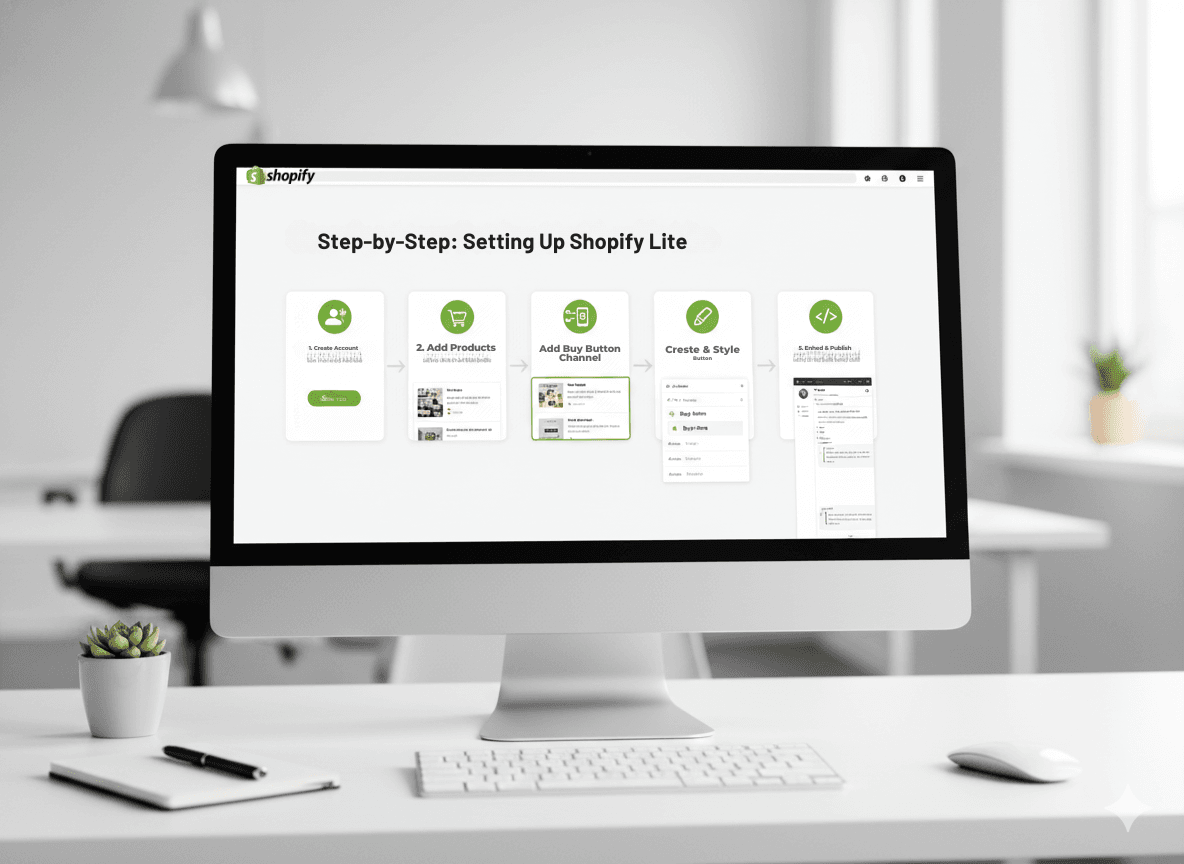
Step 1: Create the Account Sign up for Shopify. If the specific "Lite" plan is not advertised on the main pricing page, look for the "Starter" plan or contact support to see if the legacy Lite option is available for your region.
Step 2: Add Your Products Go to the Products tab in the admin. creating a product here is the same as on any plan. Upload high-quality images, write a compelling description, set the price, and input the weight for shipping calculations.
Step 3: Activate the Buy Button Channel On the left sidebar, locate "Sales Channels." You might need to click a plus sign (+) to add a new one. Search for and select Buy Button.
Step 4: Create the Button Click on the new Buy Button channel. Select the product you want to create a button for. You will enter a mini-editor.
- Style: Choose the color of the button to match your external website’s branding.
- Layout: Decide if you want just the button, or the button plus the image and price.
- Action: Choose what happens when clicked. Should it add to cart? Should it go straight to checkout?
Step 5: Generate and Paste Code Shopify will generate a block of code. Copy this. Go to your WordPress, Wix, or Squarespace site. Open the HTML editor or a "Code Block" for the page you want the product on. Paste the code. Save and publish. You now have a working store on your blog.
V. Primary Use Cases: Who Should Use Shopify Lite?

We have established what it does, but who is the ideal user? Shopify Lite is not for everyone. If you are building a brand from scratch with no audience, you are usually better off with a full Basic Store to help with SEO and discoverability.
However, Shopify Lite is the perfect solution for these four specific avatars.
1. The Content Creator or Blogger
You have spent five years building a WordPress blog about hiking. You have thousands of monthly readers. You want to sell a branded hiking boot or a digital trail guide.
- Why Lite? You do not want to migrate your massive blog to Shopify. You also do not want to set up a subdomain (shop.yourblog.com) because it fractures your traffic. You want to sell inside the blog post.
- Strategy: Place a Buy Button in the sidebar or directly in the text of a review article.
2. The Social Media Influencer
You live on Instagram, TikTok, or Pinterest. You do not have a website and you do not want to manage one. You just want a link to sell your merchandise.
- Why Lite? The Starter/Lite plan is mobile-optimized. You can use the "Link in Bio" tools provided by Shopify or simply link your Buy Button checkout page directly to your social stories. It turns social engagement into immediate sales without a complex funnel.
3. The Musician or Artist
You have a portfolio site built on Squarespace or Adobe Portfolio. It looks stunning and showcases your art perfectly. You want to sell prints or vinyl records.
- Why Lite? Artistic portfolio platforms often have weak e-commerce capabilities or high fees. Shopify is the best at e-commerce. By using the Buy Button, you keep your beautiful portfolio design but power the sales with Shopify’s robust engine.
4. The Seasonal Seller
You run a business that only operates for two months a year, perhaps selling Christmas ornaments or Halloween costumes.
- Why Lite? Maintaining a $29/month store for the 10 months you are inactive is a waste of money. Shopify Lite allows you to keep your data and inventory active for a fraction of the cost during the off-season, or serves as a low-cost way to run a temporary pop-up shop.
VI. Shopify Lite vs. The Competition
How does this lightweight plan stack up against other "button-based" or simple e-commerce solutions?
Shopify Lite vs. WooCommerce WooCommerce is free and plugs into WordPress. However, WooCommerce requires maintenance. You must update plugins, manage security, and handle hosting issues. Shopify Lite costs money, but it is a managed service. Security, PCI compliance, and checkout speed are all handled by Shopify. For a WordPress user who hates technical maintenance, Shopify Lite is often the better choice.
Shopify Lite vs. Gumroad Gumroad is excellent for digital products and is very simple to set up. However, as you scale, Gumroad’s fees can get high, and it lacks the inventory management depth of Shopify. If you plan to sell physical goods eventually, starting with Shopify Lite puts you in an ecosystem that allows for infinite growth.
Shopify Lite vs. PayPal Buttons You can put a PayPal button on a site for free. Why pay Shopify? A PayPal button is just a payment gateway. It does not manage inventory, it does not help you print shipping labels, and it does not give you sales analytics. Shopify Lite is a business management tool; PayPal buttons are just payment collectors.
VII. Limitations: What You Give Up
It is vital to be transparent about what you cannot do with Shopify Lite.
- No Online Store: You cannot build pages. You have no homepage, no "About Us" page hosted by Shopify, and no blog hosted by Shopify.
- Limited SEO: Since you don't have a Shopify storefront, you can't utilize Shopify's SEO features to rank product pages. Your SEO relies entirely on the platform where you embed the button (e.g., your WordPress SEO).
- Abandoned Cart Recovery: Depending on the specific version of the Starter/Lite plan you are on, the abandoned cart recovery emails may be less customizable than on the Basic plan.
- Theme Store: You cannot buy or use Shopify Themes.
Conclusion: The Final Verdict
Shopify Lite (and the Starter plan) represents one of the most versatile tools in the e-commerce world precisely because it refuses to be a "website builder." It acknowledges that the internet is vast and that commerce happens everywhere, not just on a dedicated storefront.
If you are a merchant who already has a digital home be it a blog, a social following, or a personal website; you do not need to move house to start selling. You just need to install a register.
By offering robust inventory management, secure checkout, and effortless embedding capabilities at a price point roughly equivalent to a sandwich, Shopify Lite democratizes access to professional e-commerce tools. It allows you to test a product idea with minimal financial risk.
However, you must keep an eye on your growth. It is a starting line, not necessarily a finish line. As your sales volume grows, the transaction fees may prompt you to upgrade. But as a launchpad? It is hard to beat.
Are you ready to turn your existing website or social media feed into a revenue-generating asset?