

In the hyper-competitive world of eCommerce, milliseconds translate directly into revenue. When you choose to build a headless storefront, you are prioritizing flexibility and performance. However, simply switching to a headless architecture does not guarantee instant speed. To truly unlock the potential of your custom build, you must master shopify hydrogen caching.
Shopify Hydrogen, built on the Remix framework, offers powerful tools to manage how data is retrieved, stored, and served to your customers. Without a robust caching strategy, your storefront may suffer from slow API calls, increased server costs on the Oxygen platform, and a frustrating user experience.
This guide will take you deep into the mechanics of caching within the Hydrogen ecosystem. We will explore how to implement strategies that keep your site dynamic where it needs to be and static where it counts.
I. The Importance of Caching in a Headless Environment

Before diving into the code, it is essential to understand why shopify hydrogen caching is different from traditional Shopify theme caching.
In a standard Liquid theme, Shopify handles the caching logic for you. You have very little control over the server-side caching mechanisms. In a headless Hydrogen environment, the responsibility shifts to you, the developer. You are responsible for deciding which API requests should be stored and for how long.
Every time a user visits a product page on your Hydrogen site, your server (likely running on Shopify Oxygen) needs to fetch data. It usually queries the Shopify Storefront API to get product titles, prices, images, and descriptions.
If you do not implement caching, every single page view triggers a real-time request to Shopify’s database. This results in:
- Latency: The user has to wait for the API to respond before the page renders.
- API Rate Limits: High traffic could trigger throttling from Shopify’s API.
- Resource Usage: It puts unnecessary load on your server functions.
By implementing intelligent caching, you store the result of that API call at the "Edge." When the next user requests the same product, the Edge server serves the stored data instantly without talking to the main database. This is the key to achieving a sub-second Time to First Byte (TTFB).
II. Understanding the Hydrogen Cache API
Hydrogen provides a built-in Cache API that simplifies the complex world of HTTP cache headers. This API is designed to work seamlessly with the Storefront API clients.
When you make a query in your loader functions, you can pass a cache strategy. Hydrogen divides these strategies into three primary categories to simplify your decision-making process.
1. CacheShort This strategy is designed for data that changes frequently but does not need to be real-time for every single millisecond.
-
Use case: Stock levels on a high-traffic launch, flash sale pricing, or homepage featured collections that rotate daily.
-
Behavior: It typically sets a short
max-age(e.g., 1 second) and a longerstale-while-revalidatewindow. This ensures that users almost always get a fast response, while the cache updates in the background.
2. CacheLong This is the workhorse for most of your static content.
-
Use case: Product descriptions, blog posts, static pages (About Us, Contact), and footer menu links.
-
Behavior: This strategy assumes the data rarely changes. It sets a long
max-age(e.g., 1 hour or 1 day). Using this for the bulk of your content is how you achieve the best shopify hydrogen caching results.
3. CacheCustom
Sometimes the defaults do not fit your specific business logic. Hydrogen allows you to define custom caching rules.
- Use case: A product drop that happens at exactly 12:00 PM where you need the cache to expire at a precise timestamp, or specific integration data from a third-party CMS.
III. Implementing Sub-Request Caching
The most common form of caching in Hydrogen is "Sub-request Caching." This refers to caching the individual API calls made within your loader functions.
Here is a practical example of how to apply this in a standard Product Route.
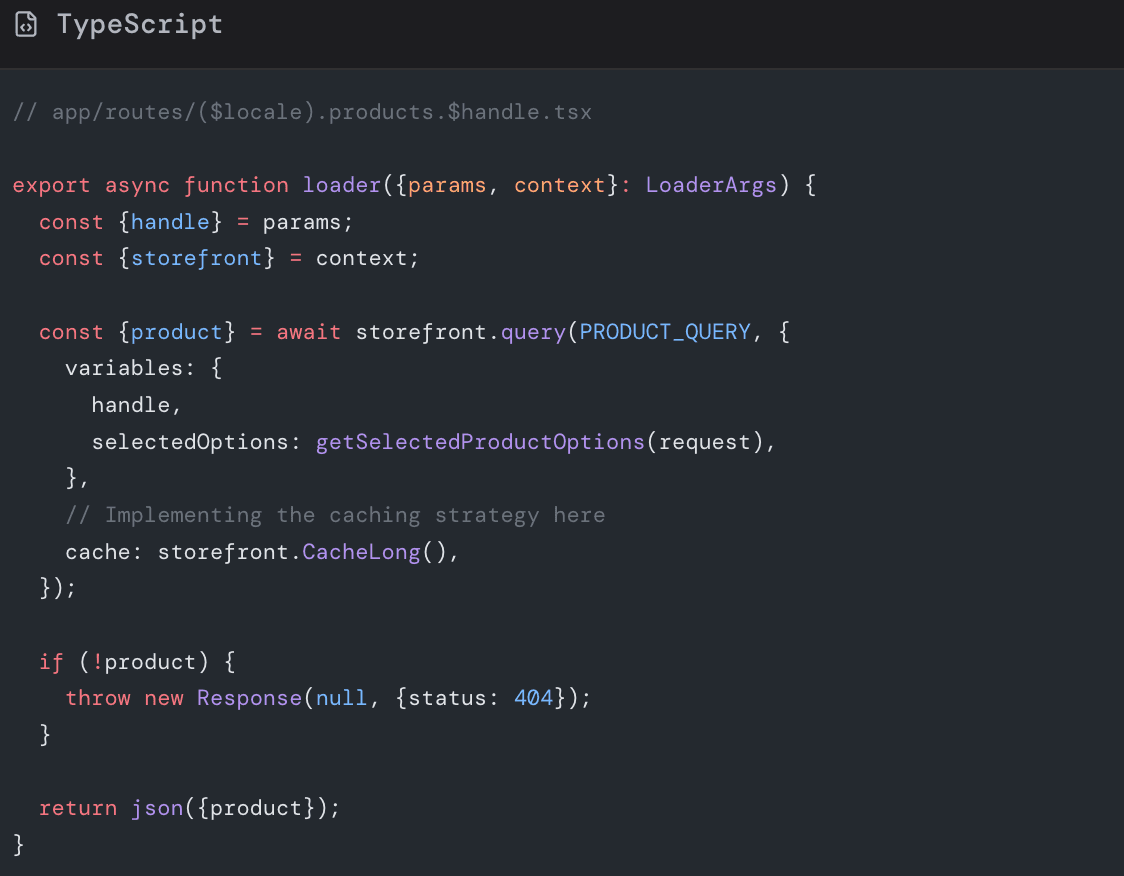
In this code snippet, the storefront.CacheLong() function tells the Oxygen platform to store the result of this specific query. Even if the page logic is complex, this heavy data fetching operation is skipped for subsequent visitors.
The Power of Stale-While-Revalidate
A critical concept in shopify hydrogen caching is the stale-while-revalidate directive.
Traditionally, if a cache expired, the user would have to wait for the server to fetch new data. With stale-while-revalidate, the Edge server serves the "stale" (expired) content immediately to the user so the page loads instantly. Then, in the background, it fetches the fresh data from Shopify to update the cache for the next user.
This technique provides the best of both worlds: the speed of static generation and the freshness of dynamic rendering.
IV. Full-Page Caching vs. Sub-Request Caching
While sub-request caching handles the data, you can also look at Full-Page Caching. This involves caching the entire HTML response generated by the server.
In Hydrogen (which is based on Remix), you control the response headers via the headers export in your route file.
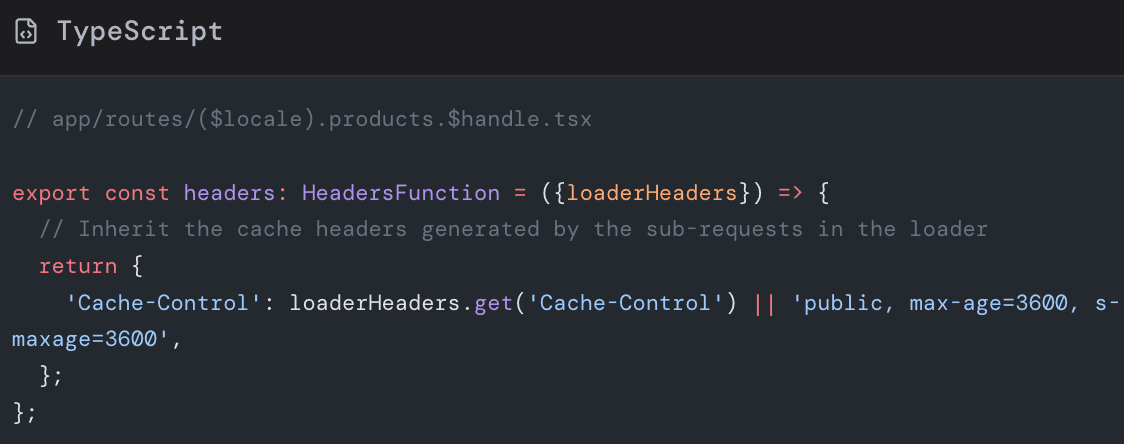
By exporting this header configuration, you instruct the browser and the CDN (Content Delivery Network) on how to treat the entire HTML document.
Warning: Be extremely careful with Full-Page Caching. If your page contains personalized user data (like "Welcome, John" or a filled cart icon), caching the full HTML could result in User A seeing User B's name. We will discuss how to handle this in the "Dynamic Data" section below.
V. Strategies for Different Content Types
To maximize performance, you should apply different shopify hydrogen caching rules to different parts of your store.
1. Products and Collections
These are high-traffic pages. Use CacheLong for the main product details (title, description, images). Pricing and inventory might require CacheShort if you update them frequently via ERP integrations.
2. Global Navigation and Footers Menus rarely change. You should cache your menu queries aggressively. A common mistake is fetching the menu on every single page load without caching. This adds unnecessary latency to every route. Fetch your menu once, cache it for a day, and use a cache key that includes the locale.
3. Marketing Pages and Blogs
Blog posts are the perfect candidate for long-term caching. Once published, the content remains static. Use a high max-age setting to ensure these pages load instantly, which is also beneficial for SEO rankings.
4. Search Results
Search results are dynamic by nature. Caching search results can be tricky because the combinations of search terms are infinite. Generally, it is better to use CacheShort or no cache for search queries to ensure relevance, unless you have a specific "popular searches" section which can be cached.
VI. Handling Dynamic Data and Personalization

The biggest challenge with shopify hydrogen caching is handling dynamic data. How do you cache a product page but still show the correct cart count or user login status?
The answer lies in Streaming and Deferring data, or fetching it client-side.
-
The Problem If you cache the HTML of a product page that includes a hard-coded cart count of "3," every user who hits that cache will see "3" in the cart, even if their cart is empty.
-
The Solution: Await the Critical, Defer the Personal Remix and Hydrogen allow you to stream data. You should await the critical, cacheable data (product details) in your loader, but defer the personalized data (cart, user recommendations).
Alternatively, the most robust pattern for Hydrogen is:
-
Server Side: Fetch and cache public data (Product, Collection, Menu). Render the page with this data.
-
Client Side: Use a
useEffector a dedicated API route to fetch private data (Cart, Customer Info) after the page has loaded.
This ensures the main content is cached at the Edge, while the personal bits are fetched fresh from the browser.
-
-
Advanced Caching: Third-Party APIs Your Shopify store likely relies on more than just Shopify data. You might use a CMS like Sanity or Contentful, or a reviews provider like Yotpo or Judge.me.
Shopify hydrogen caching principles apply here too. Do not let a slow third-party API drag down your site performance.
When fetching data from a CMS:
- Wrap the fetch call in the Hydrogen cache utility.
- Create a custom cache key.
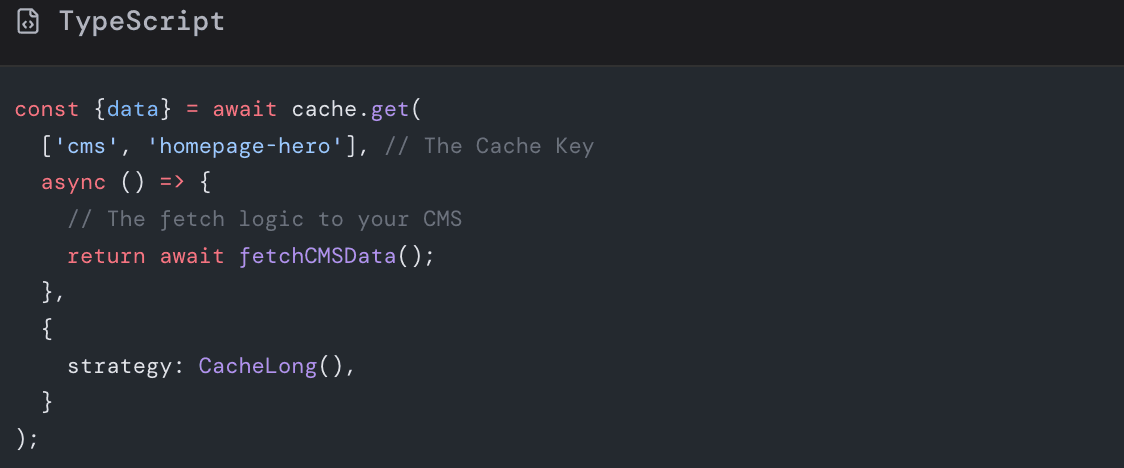
By wrapping external calls, you insulate your storefront from third-party latency. If the CMS goes down, your site stays up because the data is served from the Oxygen cache.
VII. Common Pitfalls to Avoid
Even experienced developers can make mistakes when configuring shopify hydrogen caching. Here are the pitfalls you must avoid.
1. Over-Caching Private Data
Never set Cache-Control: public on a response that contains the user's email, address, or order history. This data must be private or no-store. Accidental caching of PII (Personally Identifiable Information) is a severe security risk.
2. Ignoring Cache Invalidation
Caching is great until you change a product price and the site still shows the old price. You must understand how cache invalidation works. While Hydrogen relies heavily on time-based expiry (max-age), you can use webhooks to trigger revalidations or simply rely on stale-while-revalidate to ensure updates propagate eventually.
3. Inconsistent Cache Keys
If you cache data based on the URL, ensure you account for query parameters. For example, collection/all and collection/all?sort=price-asc should be cached as two separate entries. If you ignore the query parameters in your cache key, users sorting by price might see the default sort order served from the cache.
4. Caching Errors
Do not cache 404 or 500 error responses for a long time. If a temporary glitch causes an API to fail, you do not want to cache that failure for an hour. Ensure your logic only applies CacheLong to successful 200 responses.
VIII. Debugging Your Cache Strategy

How do you know if your shopify hydrogen caching strategy is working? You need to inspect the HTTP headers.
Open your browser's Developer Tools, go to the Network tab, and refresh the page. Click on the document request (usually the first one) and look at the "Response Headers."
Look for:
-
cache-control: This tells you the strategy being used (e.g.,public, max-age=3600). -
oxygen-cache: This header often indicates if it was a HIT or a MISS on the Oxygen platform. -
server-timing: This can show you how long the database query took versus how long the total request took.
If you see MISS repeatedly on a page that should be static, check your cache keys and your vary headers. If the request includes unique cookies or headers that vary per user, the cache might be bypassed intentionally.
IX. The Impact on SEO and Core Web Vitals
Google loves fast websites. By implementing a solid shopify hydrogen caching strategy, you directly improve your Core Web Vitals, specifically LCP (Largest Contentful Paint) and TTFB (Time to First Byte).
When a page is served from the cache, the server processing time drops to near zero. The browser receives the HTML immediately and can start painting the content. This speed boost is a ranking signal. Conversely, a slow Hydrogen store that fetches data in real-time for every user will likely struggle to rank well in competitive search results.
Furthermore, caching improves the stability of your store. During high-traffic events like Black Friday, your database might struggle to handle thousands of concurrent connections. Caching acts as a shield, absorbing the traffic at the edge and protecting your backend infrastructure.
Conclusion
Transitioning to Shopify Hydrogen opens up a world of possibilities for custom user experiences, but it requires a disciplined approach to performance. Shopify hydrogen caching is not just an optional optimization; it is a fundamental requirement for a successful headless store.
By leveraging the Hydrogen Cache API, understanding the difference between CacheShort and CacheLong, and intelligently managing dynamic data, you can build a storefront that feels instantaneous to your users.
Remember the golden rule: Cache everything that is public and shared; defer everything that is private and personalized.
Start auditing your current Hydrogen loaders today. Are you caching your product queries? Are your menus cached? Are you protecting your third-party API calls?
Don't let your beautiful headless design be ruined by slow loading times. Take control of your performance architecture now.